Settings
Administration → Settings holds the values that apply to all rooms. Each field explains itself with a short hint; Save applies everything at once.
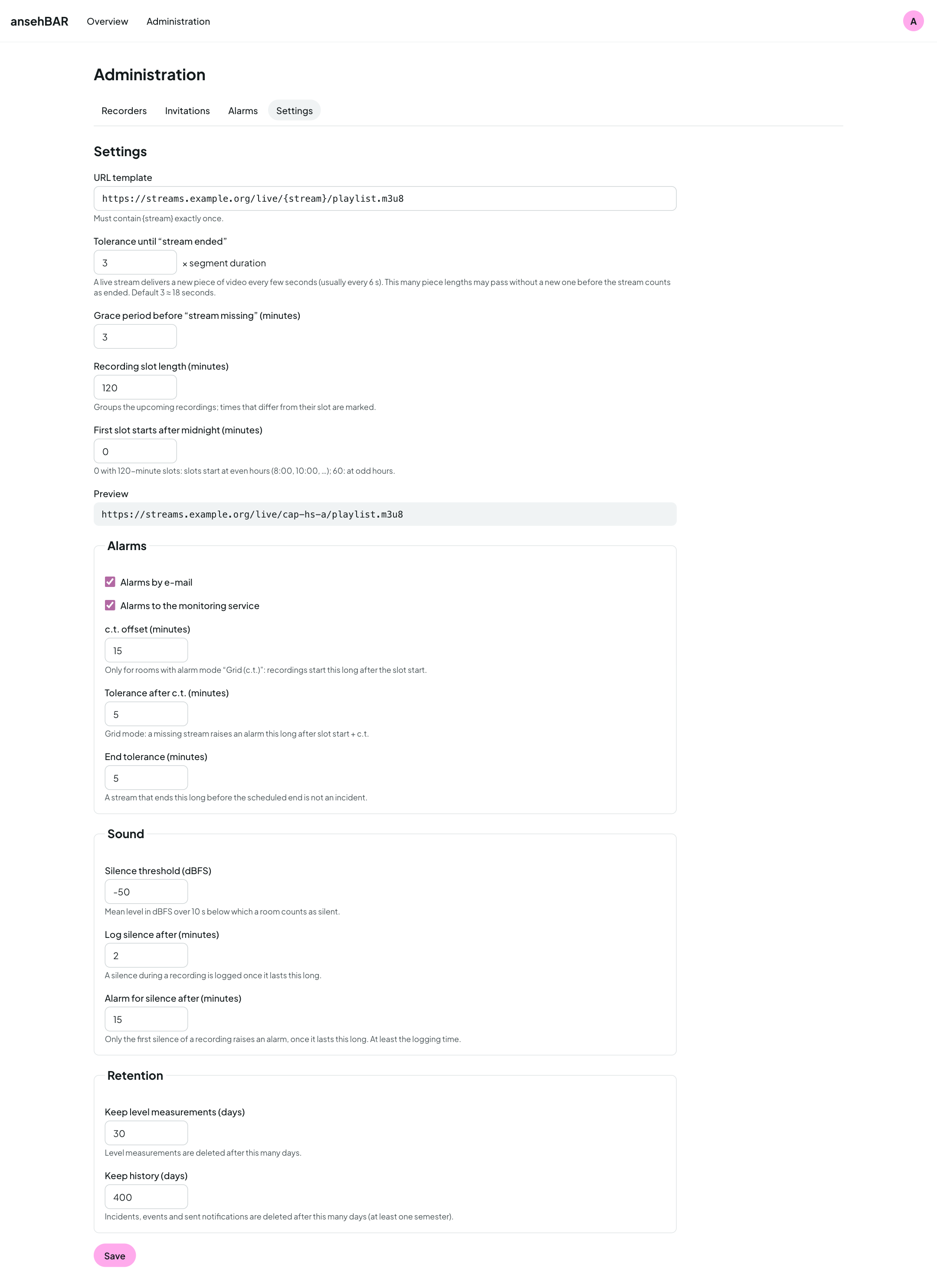
Stream
| Setting | Meaning | Default |
|---|---|---|
| URL template | Address of the streams; {stream} is replaced by the stream name. The preview shows the result. |
— |
| Tolerance until “stream ended” | This many segment durations may pass without a new video segment before a stream counts as ended. | 3 |
| Wait until “stream missing” | Minutes after the event start before a missing stream counts | 3 |
| Length of a recording slot | groups “Still scheduled today”; times that differ from the slot are marked | 120 |
| Slots start after midnight | 0 with 120 minutes: slots start at even hours | 0 |
Alarms
| Setting | Meaning | Default |
|---|---|---|
| Alarms by e-mail | channel on or off | on |
| Alarms to the monitoring service | channel on or off | on |
| c.t. offset | only for rooms in mode “Grid (c.t.)”: recordings start this long after the slot start | 15 |
| Tolerance after c.t. | grid mode: a missing stream raises an alarm this long after slot start + c.t. | 5 |
| End tolerance | if a stream ends at most this long before the scheduled end, that is no incident | 5 |
Sound
| Setting | Meaning | Default |
|---|---|---|
| Silence threshold (dBFS) | mean level over 10 s below which a room counts as silent | −50 |
| Log silence from | minutes from which a silence is logged | 2 |
| Alarm on silence from | minutes of uninterrupted silence until the alarm (only once per event) | 15 |
Setting the threshold: open the level curve of a few lectures in the room view or the calendar. If the talk sits at around −25 dBFS and a break at −60 dBFS, a threshold in between fits.
Retention
| Setting | Meaning | Default |
|---|---|---|
| Keep level measurements | days the individual measurements (basis of the level curve) are kept | 30 |
| Keep history | days events, incidents and sent notifications are kept; at least one semester (183) | 400 |
The monitor deletes older data once an hour.
GitLab tickets
Optional. With a URL and a token, you can create a GitLab ticket from the overview.
| Setting | Meaning |
|---|---|
| GitLab project URL | full address of the project, subgroups included, https:// only, e.g. https://gitlab.example.com/group/project |
| Access token | project access token with role “Reporter” and only the scope “api”, with an expiry date. The field is write-only: afterwards it shows “Token set”. “Remove token” deletes it. |
Changing the URL
If you change the URL without entering a new token, ansehBAR deletes the stored token. Enter it again right away when you change the URL.
Use a private project with a small group of members: screenshots can show people in the lecture hall and are stored in GitLab afterwards. The token is stored encrypted in the database; how the key is managed is described in the configuration guide (“GitLab-Tickets”).